

A Windows-style taskbar for macOS
Every window gets its own button. Click it and you’re there. No right-clicking a Dock icon and guessing which “Untitled” is the one you wanted.
brew install --cask taskbar

The Dock was never built for this
macOS gives one icon to an app, however many windows it has open. Finding the right window means right-clicking and reading a list. Taskbar gives every window its own button, always visible. One click, and you’re in it.

One click to any window.

Right click, read the menu, guess, click again.
See before you switch
Hover any window to preview it. Useful when six windows share one title and the name alone won’t tell you which is which.

Keep what you use in reach
Pin the apps you live in and they stay on the bar, running or not. One click to launch, one click to come back.

One desktop at a time
Taskbar shows the windows in the space you’re actually in. Switch spaces and it keeps up.

Put every window where you want it
Windows aren’t grouped by application unless you ask them to be. Each one is its own button, and you can drag it anywhere along the bar, so the order matches how you work, not the order things happened to open. Prefer each app’s windows kept together? That’s one checkbox.

- Adjustable size, font size and transparency
- Follows your system light and dark mode
- Hide window titles and show icons only
- Hide specific apps from the bar entirely
- Automatically resize windows that overlap Taskbar
- Window and app controls from the right-click menu
- Middle-click to close a window
The Start menu, where your hand already goes
Everything installed, in one alphabetical list, with search and the apps you’ve used recently. Pin the ones you live in. It’s the button on the left of the bar, exactly where you keep reaching for it.
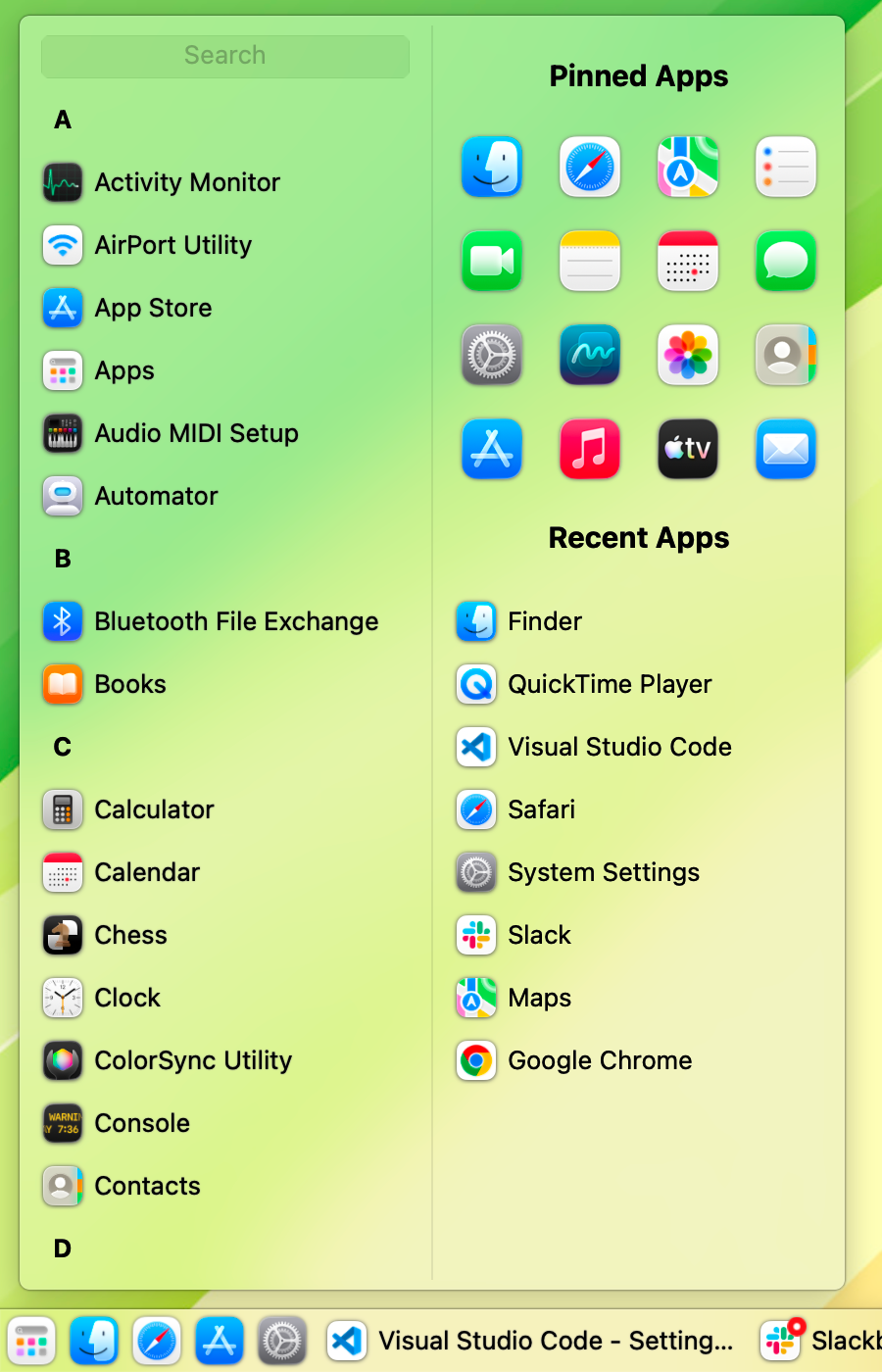
The most requested feature
A taskbar on every screen
Connect a second display and a second bar appears on it, listing that screen’s windows. Disconnect it and everything goes back where it was. No chasing the Dock between monitors, no wondering which screen it landed on this time.
Up to five screens. Or set it to your main display only, if you’d rather keep just the one.
Switching from Windows?
The Dock is the part nobody gets used to
Taskbar puts back the one habit that doesn’t survive the move: a bar along the bottom, one button per window, click to switch, click again to minimise. Nothing else about your Mac changes.
“Finally a worthy dock replacement! As a Windows user, this is exactly what I’ve been looking for. I’ve spent weeks trying various other ones, but they’re all broken and poorly implemented.”gavingt, MacUpdate
“Looks great. Feels great. Has the windows-feel that uBar lacks.”maximumarshmallow, AlternativeTo
Native, and quiet about it
Written in Swift using Apple’s own frameworks, not a web app in a wrapper. Signed and notarised by Apple. No account to create, no analytics, no advertising. Taskbar connects to the internet for two things only: checking for updates, and sending a crash report if you have opted in. Both can be switched off.
Supports macOS 10.13 through the current release, on both Intel and Apple Silicon. One developer, shipping since 2023.
What people say
“I just love this app. After installing it this weekend, I couldn’t wait to get back to work Monday morning and use it some more.”gycinci, MacUpdate
“Overall, this is probably the best way to add a Windows-like taskbar to macOS. The app is well-built, with lots of room for personalization.”Catalin Chelariu, Softpedia review, 4.5/5
“After trying several applications I came across this one. It’s so much more clear and convenient to use than the Dock, which is always on either one of 3 screens and always overlaying or acting weird on my windows.”raymondhvh, MacUpdate
Free until 19 December 2026
After that, Taskbar becomes a one-time $25 purchase, with a month to try it first. Not a subscription: you buy it once and keep it. Everything you’ve set up carries over; it arrives as an ordinary update, not a different app.
Questions
Why does Taskbar need Accessibility permission?
It’s the only way macOS lets an app see the list of open windows and switch between them. Without it, Taskbar can’t do anything at all. It’s granted once, in System Settings, and Taskbar walks you through it on first launch.
Why does macOS say Taskbar is recording my screen?
Window thumbnails are screenshots, and macOS shows that indicator for any app allowed to take them. Taskbar records nothing and sends nothing. If you’d rather not see the indicator, turn thumbnails off and the permission is no longer needed.
What happens to the Dock?
Taskbar moves it to the side of the screen and sets it to auto-hide, so the two don’t fight for the same space. You can also hide it completely, or leave it exactly as it was.
Does Taskbar collect data about me?
No. There’s no account, no analytics and no advertising. It checks for updates, and sends a crash report only if you switch that on. Both are optional.
Does it work with more than one monitor?
Yes. One taskbar per screen, each showing that screen’s windows. You can also set it to appear only on your main display.
Which versions of macOS does it run on?
macOS 10.13 High Sierra and later, on Intel and Apple Silicon.
What does it cost?
Nothing today. From 19 December 2026 it becomes a one-time $25 purchase with a one-month trial. No subscription.
Get Taskbar
brew install --cask taskbar
 lawand.io